Table of Contents:
- What is Hyvä Equinox and which packages does it cover?
- How do Linked Products work and how do they differ from configurable products?
- Category Merchandiser: How to arrange products in a Magento category?
- Form Builder and email templates in Hyvä CMS
- AI content generation and other new features in Equinox
- How to leverage Equinox in your store?
In October 2026, the creators of Hyvä released Equinox—an update that expands the Hyvä Commerce and Hyvä Enterprise packages with features for managing product catalogs, on-site content, and customer communication. Among these are four new Hyvä Commerce modules: Linked Products for grouping products, Category Merchandiser for drag-and-drop category management, Form Builder for creating forms, and a visual editor for transactional emails and newsletters.
In our article "Online Store on Hyvä," we discussed what working with a Hyvä-based store looks like and how much the individual licenses cost. This time, we look closely at what Equinox changes, how the new features work, and which ones are production-ready versus those best treated as tests for now.
What is Hyvä Equinox and which packages does it cover?
Equinox is Hyvä’s autumn product release, covering updates to Hyvä Commerce, Hyvä Enterprise, Hyvä Checkout, and Hyvä Theme.
Most of the new features have landed in the paid packages: Hyvä Commerce for Magento Open Source and Hyvä Enterprise for Adobe Commerce. Users of the free Hyvä Theme received a new Font API and security fixes in this release.
The remaining features require a paid license. A store running on Magento Open Source requires Hyvä Commerce version 1.4.0, which also includes Hyvä CMS 1.3.0. Certain features require additional setup after upgrading: Store Credit is disabled by default, and AI content generation requires a connection to a model provider. Linked Products, Category Merchandiser, Form Builder, and email templates have been available for beta testing since summer. Equinox marks their first stable release.
Most of the new features are already marked as stable. The exception is AI content generation, which Hyvä designates as experimental:
| Feature | Purpose | Status |
|---|---|---|
| Linked Products | Grouping standalone products together, e.g., by color | Stable |
| Category Merchandiser | Visual arrangement of products within a category | Stable |
| Form Builder | Contact forms, quote requests, inquiries | Stable |
| Email & Newsletter Templates | Visual editing for transactional emails and newsletters | Stable |
| AI Content Generation | Generating pages or sections based on a brief | Experimental |
How do Linked Products work and how do they differ from configurable products?
In standard Magento, variants like colors or sizes are typically handled via configurable products. The customer sees a single product card and selects an option from a list, while the individual variations lack dedicated standalone pages.
This approach works well when variants differ by only a single attribute. It falls short when each variant features different photos, descriptions, pricing, or reviews and should appear independently in category listings.
Linked Products in Hyvä Commerce works differently. It connects standalone products into a group based on a shared attribute, such as color, material, or size.
The group has no parent element, meaning each variant maintains its own page, URL, price, inventory, and reviews. On its product page, customers see color swatches or variant names linking to the other items in the group.
For example: a store sells the same sofa in green and navy blue. As a configurable product, the sofa has one category card and one page where the customer picks a color from a dropdown. With Linked Products, the green and navy sofas exist as separate catalog items—each with its own photos, description, and URL—displaying as two distinct tiles in the category. On the green sofa's page, clicking the navy swatch redirects the customer to the navy sofa's dedicated page.
How it works in the admin panel:
- Groups are created under the Catalog menu in the Linked Product Groups section, or directly on the product edit screen.
- Groups can be based on custom store attributes such as dropdowns, visual swatches, or text swatches. System attributes (e.g., SKU, product name) and multi-select attributes are not supported.
- Every variant in a group must have values populated for all selected group attributes. If two items share identical values, the panel displays a warning that one of them will be unreachable for customers.
- Groups can be imported and exported via CSV files based on SKUs and attribute codes, both through the admin panel and via the CLI.
- Swatch display can be disabled for specific websites or store views without deleting the underlying groups.
Stores where variants represent distinct products from a customer’s perspective stand to gain the most: furniture in diverse fabrics, apparel lines requiring separate photo shoots per color, or cosmetics in multiple shades. For standard use cases, configurable products remain an effective option, and both approaches can coexist within the same store.
Dedicated variant pages can also capture more specific search engine queries. However, it is essential to plan unique copy for each variant to prevent duplicate content issues.
CSV importing is particularly valuable for stores integrated with PIM or ERP systems. Groups can be maintained within the source system and synced to Magento alongside standard product data, eliminating the need for manual setup in the admin panel.
Category Merchandiser: How to arrange products in a Magento category?
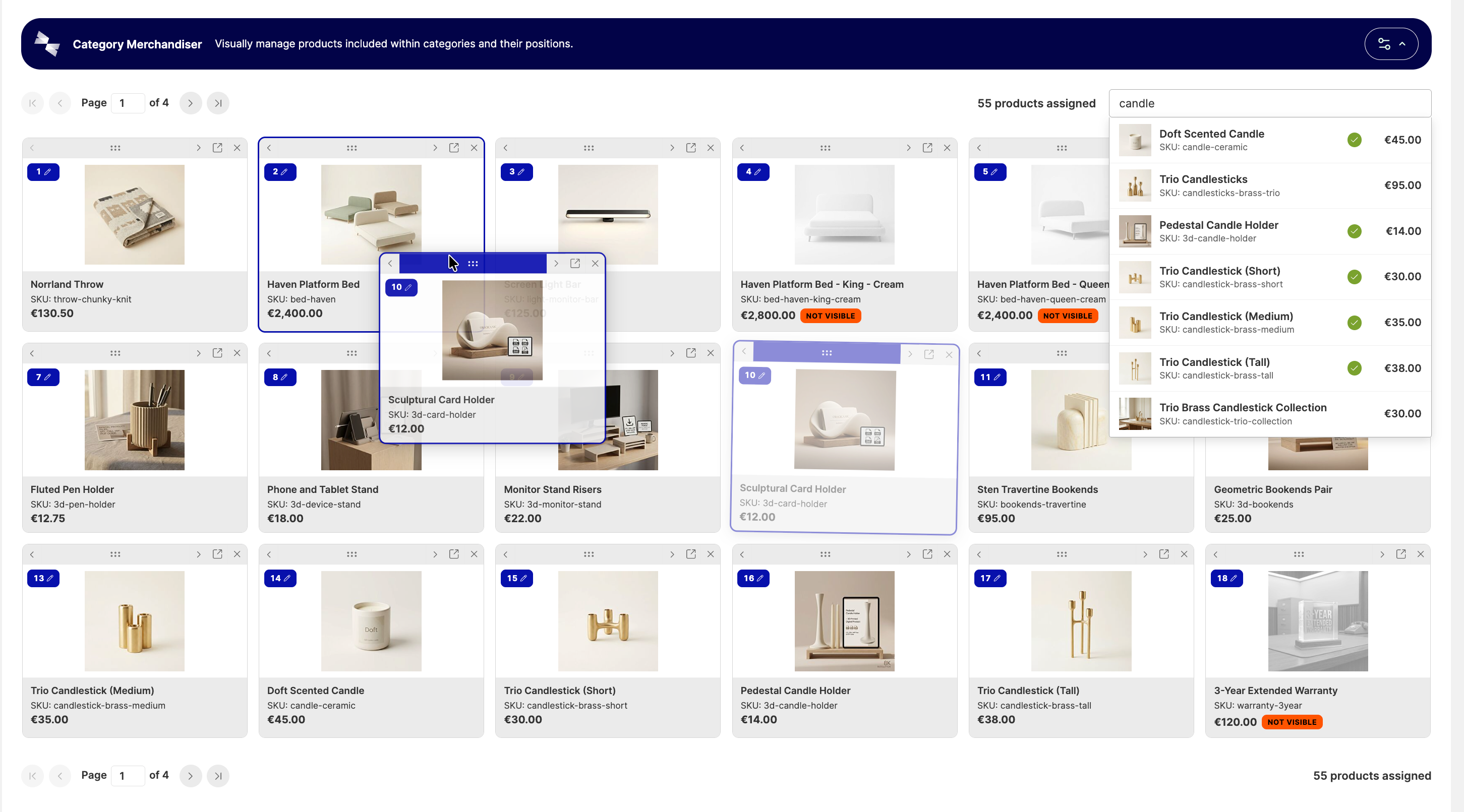
Product order within a category directly impacts sales, especially during collection launches and seasonal campaigns. In standard Magento, sorting is managed via a table by manually keying in position numbers next to each product. Category Merchandiser replaces this table with an intuitive visual grid featuring product imagery.
The new tool allows you to:
- drag and drop product cards into place, enter explicit positions, or nudge items one slot at a time (including keyboard navigation),
- search products by name or SKU while viewing immediate stock levels, catalog visibility, and category assignment status,
- inspect layouts independently across different store views (e.g., language versions or localized markets)—with product status, visibility, and pricing reflecting the active selection,
- save custom grid settings on a per-administrator basis.
The tool does not require separate ACL permissions—it uses existing category management rights. An admin toggle also makes it simple to revert to Magento’s native table view whenever needed.
The merchandiser also streamlines troubleshooting. Each item shows why it might not appear on the storefront: whether it is disabled, hidden in the catalog, or out of stock. Because statuses reflect the selected store view, diagnosing whether an issue is global or isolated to a single market is straightforward.
 https://www.hyva.io/equinox
Form Builder and email templates in Hyvä CMS
Both features operate inside the Liveview editor—the same environment used to edit pages and blocks in Hyvä CMS. This eliminates any extra learning curve, offering draft states, publication workflows, and revision histories consistent with other CMS content.
How does Form Builder work?
Historically, introducing a new form in Magento—such as a quote inquiry, support request, or event signup—typically called for a third-party extension or developer intervention. Form Builder introduces a native content type that your team can build independently and embed into any CMS page or block.
Available fields include text, email, phone, number, date, dropdowns, multi-select, consent checkboxes, and hidden fields. Forms can be single-page or broken into multi-step wizards with Next/Back navigation.
Forms include built-in spam protection, with optional Google reCAPTCHA support. Prior to publication, forms can be verified via preview mode, dispatching an explicitly labeled test submission to your inbox.
One detail requires upfront planning: form submission data is not stored in the Magento database. Submissions are delivered to designated email addresses and can optionally be routed to webhooks, such as Zapier or directly into a CRM.
For B2B stores where RFQ forms serve as the primary lead driver, connecting submissions directly to a CRM ensures inquiries do not remain siloed in email accounts.
How does the email and newsletter template editor work?
Every Magento store sends transactional emails automatically: order confirmations, invoices, shipment updates, and password resets. Because their layout is defined in raw HTML, updating a logo, button color, or footer text traditionally required developer involvement.
The template editor lets you design these messages directly in the admin panel, just like pages in Hyvä CMS. Emails are built from ready-to-use blocks such as headers, text, buttons, order summaries, and shipping details. Customer names or order IDs are inserted from a dynamic variable list, which Magento populates upon sending.
Prior to publishing, the editor provides client-rendering previews across popular email clients, flagging potential layout inconsistencies. Test emails can also be dispatched directly to your own inbox.
Newsletters can be designed within the same interface. However, delivery is handled by Magento's native newsletter engine, which supports only basic broadcasts to subscribers without advanced segmentation or automated flows. If your store relies on a dedicated email marketing platform, the editor's primary value will lie in transactional messaging.
AI content generation and other new features in Equinox
AI content generation in Hyvä CMS
This new feature drafts complete pages or sections based on a textual brief. The output loads into Hyvä CMS, where your team can review and refine it. The generator respects your theme’s components and color palette, and prompts can reference specific products, categories, and images. High-performing results can be saved and reused.
Hyvä classifies this feature as experimental. It requires access to an external AI model, with out-of-the-box support for OpenAI, Google Gemini, and Anthropic, alongside custom integration options. Merchants configure their own API keys from their preferred provider, paying standard model consumption fees directly to that vendor. The feature itself is included within the Hyvä Commerce subscription. Generating full pages and assets also requires an intermediary service (AI Worker), which Hyvä recommends deploying on Cloudflare Workers or a self-hosted Node server in production.
AI content translations for international markets
Hyvä CMS previously supported store view translations, including AI-assisted workflows via the standalone Hyvä CMS AI Translations module. In Equinox, translations receive a dedicated workspace: content can be filtered by store view and translation status, with one-click navigation to the next untranslated field. Multilingual copy can also be exported and imported via CSV files to facilitate external localization workflows.
This delivers substantial value for multi-region stores. AI translation currently applies to content managed inside Hyvä CMS—namely pages, blocks, and category/product descriptions edited within the CMS interface. Full product catalog translation is slated for later in the roadmap.
Advanced admin permissions
Advanced Admin Permissions enables assigning multiple roles to a single administrator, avoiding the need to duplicate complex roles for minor permission tweaks. It introduces deny-based roles that override other permissions, time-limited role assignments, and scoped access restricted to specific websites or store views. Every role change is logged to an audit trail. This is particularly useful for multi-store setups where local teams should only access their respective regional storefronts.
Store Credit: Customer balances for future purchases
Store Credit allows granting credit directly to customer store accounts. Customers can apply this credit in whole or in part during cart or checkout steps to offset order totals. For returns, stores can issue store credit rather than cash refunds, keeping revenue within the business while enabling seamless future shopping. In Magento Open Source, this capability previously required a third-party extension.
Every balance adjustment is recorded as an immutable log entry with a reason and associated order reference, simplifying accounting and auditing. Customers can view their credit balance and transaction history in their customer portal, and stores can configure notifications for balance accrual and usage. Balances can be imported via CSV—useful when migrating platforms—and queried via REST or GraphQL.
Store Credit represents the first installment in Hyvä's planned customer retention suite. Subsequent releases will introduce gift cards (with a beta coming soon), followed by a loyalty program and native returns management. Store credit will also integrate with Hyvä POS for in-person transactions.
Hyvä Checkout 3.0: What to check before updating
Hyvä is preparing a major checkout release powered by Magewire v3. Currently in beta, it will launch as Hyvä Checkout 3.0, delivering improved performance and migration tooling. The new release requires PHP 8.2 or higher alongside a Tailwind 3 or 4 theme; components written for earlier Magewire versions are supported via a compatibility module.
When planning an upgrade, verify that third-party payment and shipping modules offer versions compatible with Hyvä Checkout. Before deploying to production, conduct end-to-end testing across all payment and delivery methods in a staging environment (e.g., BLIK, card payments, parcel lockers, and financing/installments).
The current checkout branch has received fixes for registered customer address handling. Optional reCAPTCHA protection has also been introduced at three checkout checkpoints: login, coupon code application, and final order placement. This protects against credential stuffing, automated coupon cracking, and card testing fraud on order forms.
Hyvä Enterprise: What's new for Adobe Commerce
Adobe Commerce merchants can now capture custom customer attributes during checkout that were defined in Adobe Commerce, such as industry sector or ERP customer IDs. The checkout also supports Gift Registries. Hyvä has additionally refreshed its integration with Adobe Commerce Live Search: the search engine now indexes custom product attributes like material or collection. Shoppers can search directly by collection name, and stores can surface these details within search results. According to Hyvä, Hyvä Enterprise now covers all native Adobe Commerce features. Note that these new capabilities apply exclusively to Hyvä Enterprise licenses purchased on or after July 1, 2026, or renewed thereafter. Stores holding older licenses will need an active renewal to gain access.
How to leverage Equinox in your store?
Equinox shifts Hyvä Commerce from a pure frontend and checkout layer toward an operational toolkit for daily eCommerce management. Category sorting, form creation, and email layouts represent areas where marketing teams have traditionally depended heavily on developers.
What this means in practice depends on your current starting point:
| Starting Point | What Equinox Changes | Recommended Action |
|---|---|---|
| Magento store on standard frontend (Luma) | Migrating to Hyvä Commerce provides a faster frontend along with native tools marketing teams can operate without developer support. | When scoping migration costs, factor in that forms, email templates, and visual merchandising are bundled into the Hyvä Commerce license and do not require custom development. |
| Store running free Hyvä Theme | Equinox features are available exclusively in Hyvä Commerce and Hyvä Enterprise. | Compare the license fee (€3,000/year) against the development costs of building custom forms, email templates, and category merchandising tools. |
| Store already on Hyvä Commerce | Equinox features are included within your active subscription. | Plan the upgrade to version 1.4.0 and determine which new modules to enable. |
| Adobe Commerce store with Hyvä Enterprise | Includes all Hyvä Commerce features plus customer attribute support, Gift Registry checkout flows, and enhanced Live Search integration. | Confirm your license includes the new features (purchased or renewed after July 1, 2026) and assess whether native features can replace existing third-party extensions. |
Before updating your store to Equinox-enabled versions, consider the following checklist:
- Test the entire checkout journey in staging, with particular attention to payment and shipping modules in Hyvä Checkout.
- Distinguish between production-ready features (Linked Products, Category Merchandiser, Form Builder, email templates, Store Credit) and experimental or beta components like AI content generation and Hyvä Checkout 3.0.
- Audit and standardize your attribute model before deploying Linked Products, deciding whether groups will be maintained natively in Magento or synced from a PIM/ERP.
- Define recipient routing and determine CRM webhook integration requirements for each form.
- Create a full database backup and review admin roles after updating—custom roles may lose access to Hyvä CMS, forms, and related menus until newly introduced permissions are granted. For stores that tested the Form Builder beta, the update will also rewrite existing form schemas.
- Prepare an inventory of transactional emails to transition into the new visual builder.
Let's discuss new Hyvä capabilities for your store
Equinox empowers eCommerce teams with greater independence in their daily workflows: sorting categories, setting up forms, and refining transactional emails. To deliver maximum efficiency, these features require careful planning—from attribute schema design and CRM integrations to thorough checkout regression testing.
At Advox, we implement Hyvä across greenfield builds and migrations from legacy Magento frontends, partnering with brands such as Olivit and Kinderkraft. If you are exploring how Equinox fits into your roadmap, get in touch with us. We will help identify where to start and what to prepare before upgrading.